Get an Android Application

Own an Android app for your Website or blog
kindly contact:: sarthajroshan@gmail.com

Tawk.to

Followers

Buy me a Coffee

Popular Posts

Youtube

Services

Showing posts with label Tech. Show all posts

Sunday, February 11, 2018

How to get Whatsapp Payment feature..Here is the Trick

Yes, It is true..


       Now You can use Whatsapp not only for messages/calls but also for sending Money. 

The long awaited feature is out in India. The Payment service is available for limited beta testers of Whatsapp directly. Others need to wait until another update from whatsapp. But If you didn't like to wait...Here the way..

The payment service users can invite their friends into Whatsapp Payments.

How the Whatsapp Payment Works:

            Whatsapp Payment feature running with the support of Unified Payment Interface (UPI) of India. Yes, it is simple like using apps like tez. It is easy to send money like sending images and videos.

Note : For enable this service your number must linked with any of the UPI enabled bank.

How to get The Whatsapp Payment fetaure;

  • Update Your whatsapp from Playstore 
  • Goto Whatsapp Settings >> Payments ( If you do not see the Payment Option follow this Invite Link to get invited in to payments service)
    Whatsapp Payment Settings
  • In Payments option Accept terms and conditions
    Whatsapp Payment setup
  • Then Click on Verify SMS (Must have balance in your number)
    Whatsapp Payment setup verify
  • Select Your Bank
    Whatsapp Payment setup bank
  • Select Account
    Whatsapp Payment setup account
  • Done.


How to Send Money through Whatsapp:

  • Select your Contact and Click on Attachment button
  • You can see the new option payment
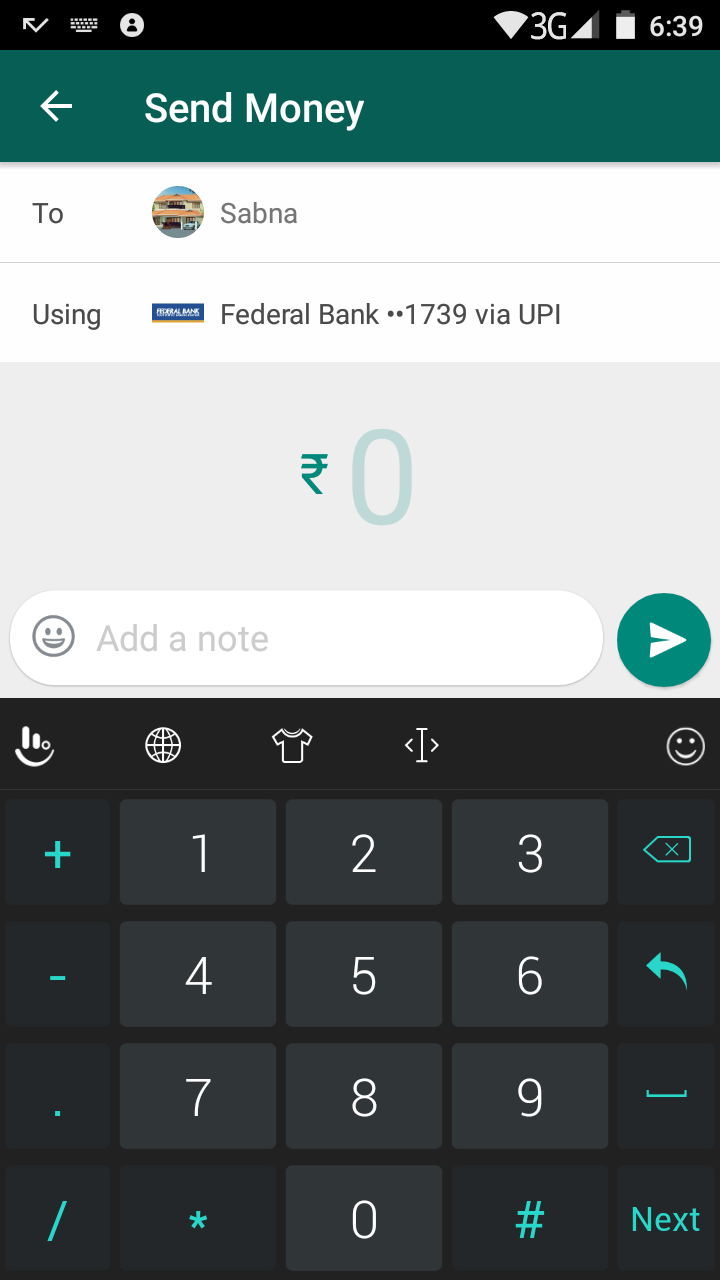
    Whatsapp Payment send money
  • Enter the amount and Create/Enter your UPI PIN.
     
  • Done.


How to Invite friends to Whatsapp Payments:

  • Open Chat of your friend
  • Click attachment >> Payment
  • Done

Saturday, November 5, 2016

Enable Whatsapp STATUS BAR feature

HOW TO ENABLE WHATSAPP STATUS BAR 

Whatsapp introducing STATUS feature. By this you can share your status (photos/videos)  like in Facebook, snapchat etc..
 But it is not introduced to public. if you want to try this feature, then follow this post..

     APPS REQUIRED

>> Whatsapp latest beta version - download
>> WA Tweaks App - Download

                       STEPS

 Enable Whatsapp's new Status tab feature on android device

.. Install both whatsapp latest beta version app and WA Tweaks [downloaded from above links] on your rooted android device.
.. Now Force stop your whatsapp app. [you can force stop whatsapp app from settings>> apps>whatsapp>>force stop]
Then open WA Tweaks, allow root permission
.. Now you can see a button to enable 'new home ui' there. just enable 'new home ui' in wa tewaks app .. now open whatsapp app, there will be a new status tab . And the status tab feature will be ready to use

Wednesday, November 2, 2016

Use Jio 4G sim in 3G phones

you can easily use your free jio sim in any of the 3g devices. You need to follow the trick very carefully.


 FOR QUALCOMM CHIPSET 3G PHONE


  • Download Shortcut master android application from Here.
  • After download simply install in your android device.
  • Now open this app and select engineering mode or service menu from main menu.
  • Here find system APP OPTION if this option is not available then dial *#2263# from dialer app. Now Go To Key Input And Enter 0000 and Wait some times.
  • After that select System app option and you need to change LTE bands.
  • Now go to Select - Protocol - NAS - Network Control - Band Selection - LTE Band and select Band 40.
  • After that restart your 3G phone and enjoy reliance jio 4G sim in your 3G phone.


for MEDIATEK CHIPSET 3G PHONE

  • First, step to download MTK Engineering Mod android application from here
  • After download, this app install on your android device.
  • Now open this app and dial your engineering mod code to open engineering code find your correct code for your android device according to model.
  • This android application allows you to run advanced setup from engineering mode menu. This code is different for all android device.
  • After service mode is open you need to configure preferred network.
  • In network mode option select 45 LTE/WCDMA/GSM option.
  • After select simply restart your android device and enjoy reliance jio 4G sim in your 3G phone.

Tuesday, October 25, 2016

Use Android device as a Web Server

Use Android device as a Web Server


Hello Guyz,
       
        In this post I am gonna show you how to make your Android device as server for hosting a website or making files online. For this, I introduce you an app called “ Palapa Web Server”. You can download this app from playstore.
                            You may familiar with windows apps like XAMPP to host a web server. This app also has easy modes to work with. Follow the step by step guide here
1.     Download Palapa Web Server from playstore 
2.     Open the app          Then you can see a dialogue appears for installing plugins for web hosting. Click install on that dialogue window
3.     Edit Settings             There have so many settings for advanced web hosting like php integration database integration etc.. you can edit it if you needed. Also you can set port and select folder in the storage that you want to host


4.     After saving settings click on “start web server” or “start all services” to make your website online

5.       
Then you can see your Ip address and Port


You can Type http://127.0.0.1:8080 (by this tutorial) to see your site online


Saturday, October 8, 2016

Disable Driver signature enforcement permanently in Windows

Hi guyz,
          Today I am gonna show you how to disable driver signature enforcement permanently in windows 7/8/10. You may familiar with temporary disabling of driver enforcement by STARTUP RECOVERY. Here I tell you a different method...
Before that I can describe some need for this disabling.
·       To ignore driver signature not valid message and install the driver
·       To ignore driver blocked message
·       It is necessary for flash an android device


STEP-1
Open command prompt with administrator privileges
STEP-2
Type “bcdedit.exe /set nointegritychecks on” without quotes
You can see the success message and you are Done!!

Now your driver signature enforcement disabled permanently

If you want to enable it, then Type
“bcdedit.exe /set nointegritychecks off”


Thank You…Don’t forget to subscribe our website for more techs


Sunday, October 11, 2015

Get unlimited free recharge for all cariers

- No comments

Hello friends
               you may see many pay per Download apps and may tried....But I discovered a new app. It is awesome . Giving recharge in 30 or 40 seconds after the app installation. You can earn rs100 per day easly..
Just click to download the app
Install the app
Register and Download apps from it..
Earn recharge
Refer Friends
Earn recharge

Sunday, August 23, 2015

Edit your place in Google Maps

Hello friends,
                Now you can edit google maps. Google have a Mapmaker to edit Google maps...
You can edit your place details and and add other places in it...

Ever wondered how people add a place to Google Maps? Well if you don't see a place that is there, add one! People can benefit from your contribution of adding places.
Ad


  1. 1
    On Google Now ---- >>Map Maker is temporarily unavailable for editing. Learn more.
    Ad
  2. Create a Google Map Location Step 1.jpg
    2
    #Go to the Google Map Maker web page. The site ishttp://www.google.com/mapmaker .
  3. Create a Google Map Location Step 2.jpg
    3
    Sign in (if you have not already) with your Google account.
  4. Create a Google Map Location Step 3.jpg
    4
    On the main page, click "Add New" and from the drop down menu select "Add A Place"
  5. Create a Google Map Location Step 4.jpg
    5
    Zoom in where the place is that you want to add.
  6. Create a Google Map Location Step 5.jpg
    6
    On the map, drop the marker on the building or area where the place is.
  7. Create a Google Map Location Step 6.jpg
    7
    Select a category. So say if the place you are adding is a restaurant, click on restaurant or type it in the text box.
  8. Create a Google Map Location Step 7.jpg
    8
    Add the name of the place. You can also add contact information and a description.
  9. Create a Google Map Location Step 8.jpg
    9
    Add a address so when people search it, Google Maps can generate driving directions.
  10. Create a Google Map Location Step 9.jpg
    10
    If you want, you can add an area for the place. Do this by clicking "Add New"and click "Draw a Shape" from the drop down menu.
  11. Create a Google Map Location Step 10.jpg
    11
    Click the save button.

Friday, June 5, 2015

Create and edit Subtitles of videos movies

- No comments

You want to watch movies in languages you unknown. There is only an easy way is subtitles. Subtitles is the text showing the dialogues of the movies(you may saw it). Today i showing you how to create that type of subtitle your own. If you have done a short film in your languages and you want to see that film whole world...? Here is the way for it. Make it Subtitles.


I can describe it shortly..by step by step

For new Creation

  1. download the software SubtitleEdit and install it from here
  2. Open the software and Follow Video-> Open and select your video
  3. Then play your video and enter the dialogues at the time.

For Existing creation

  1. Open the software and follow File->Open and select your subtitle file
  2. Then follow Video->Open and select video
You can download subtitles from subscene.com or subtitles.at


JioFi AT RS 999

Buy me A Coffee